Virtual coworking & body doubling
2 working together now

Find your crew. Get things done, together.

Join online focus sessions with people who help you show up. Your tasks, your chat and your crew are still there between them.

Founding membership • $15/month
Save songs
Share LinkedIn
Screen sharing
Persistent Project Tasks
Crew chat
Focus goals
Observer seats
Recurring sessions
Private crews
Chat-only check-ins
Organize projects
Automatic mic muting
Flexible sessions
Meet your people
Built for:
iOS & Watch ↗
MacOS
Web ↗

About these screenshots

We're just getting started, so the people in these screenshots are AI-generated to show what a session feels like. Everyone you'll work alongside in Crews is real.

01 · Find your session

Find a session that fits your day.

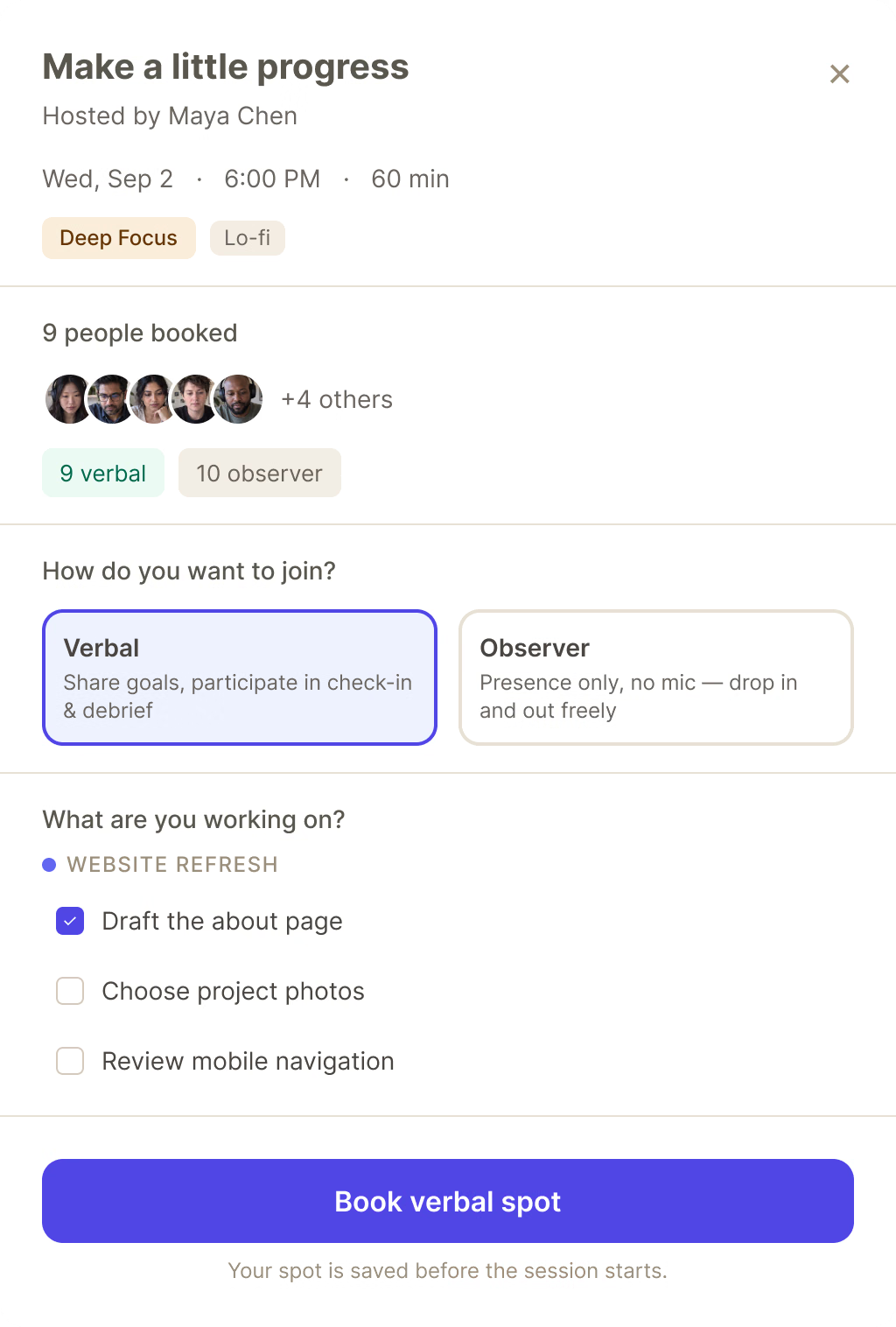
Find company for the work ahead. Browse public sessions, join your crew, or host your own. Choose how you participate.

Check in out loud, or in chatSay what you're working on, or share it in chat. You can take part without turning on your mic.
Full verbal seats? Join as an observer.Stay with people you work well with when verbal seats fill up. Observer seats keep your mic off and your camera optional.
Choose your time and your peopleBook a session that fits your schedule, or host one for everyone, your crew, or people you invite.
Learn more →
02 · Focus together

Your own work. A little company.

Share music. Find your next favorite.See what your host is listening to, explore the tracks shared in your session, and save songs you want to come back to.
See what everyone is working onShare the task you're working on and see what others are tackling. Set a focus goal for each block to keep your next step in view.
The room stays live while you browseOpen your tasks, visit a profile, or check the schedule. You stay connected to your session as you move around Crews.
Check the schedule →
03 · Keep your momentum

The work carries over. So do the people.

A good session gives you more than a finished task. Keep the conversation going, follow people you click with, and pick up your work next time.

Finish the conversation after the timerSession chat stays open for a while after the session ends. Share a link, celebrate a win, or make plans to work together again.
Follow the people you work well withVisit their profile, connect through LinkedIn or other social links, and follow them on Crews so you can find each other again.
Your unfinished work comes with youKeep tasks organized in projects and bring them into your sessions. Unfinished work stays saved, ready for your next block.
Join a free session →
04 · Build your crew

Turn good company into a regular thing.

Form or join a crew with people you want to keep working alongside. Bring your sessions, conversations, and shared resources together in one place.

Pages and resourcesKeep useful links, session guides, and shared knowledge somewhere your crew can find them.
Share your screen in a sessionWalk through a draft, explain an idea, or get feedback with your work on screen.
Keep everyone in the loopShare progress, post updates, and make plans in your crew feed. Give people a reason to reconnect between sessions.
Or sponsor the whole roomCoaches, teams and cohorts can cover their people's seats and run the crew as their own.
See how crews level up →
Image — the schedule
The horizontal schedule rail with today's rooms on it, one card mid-hover. 4:5.
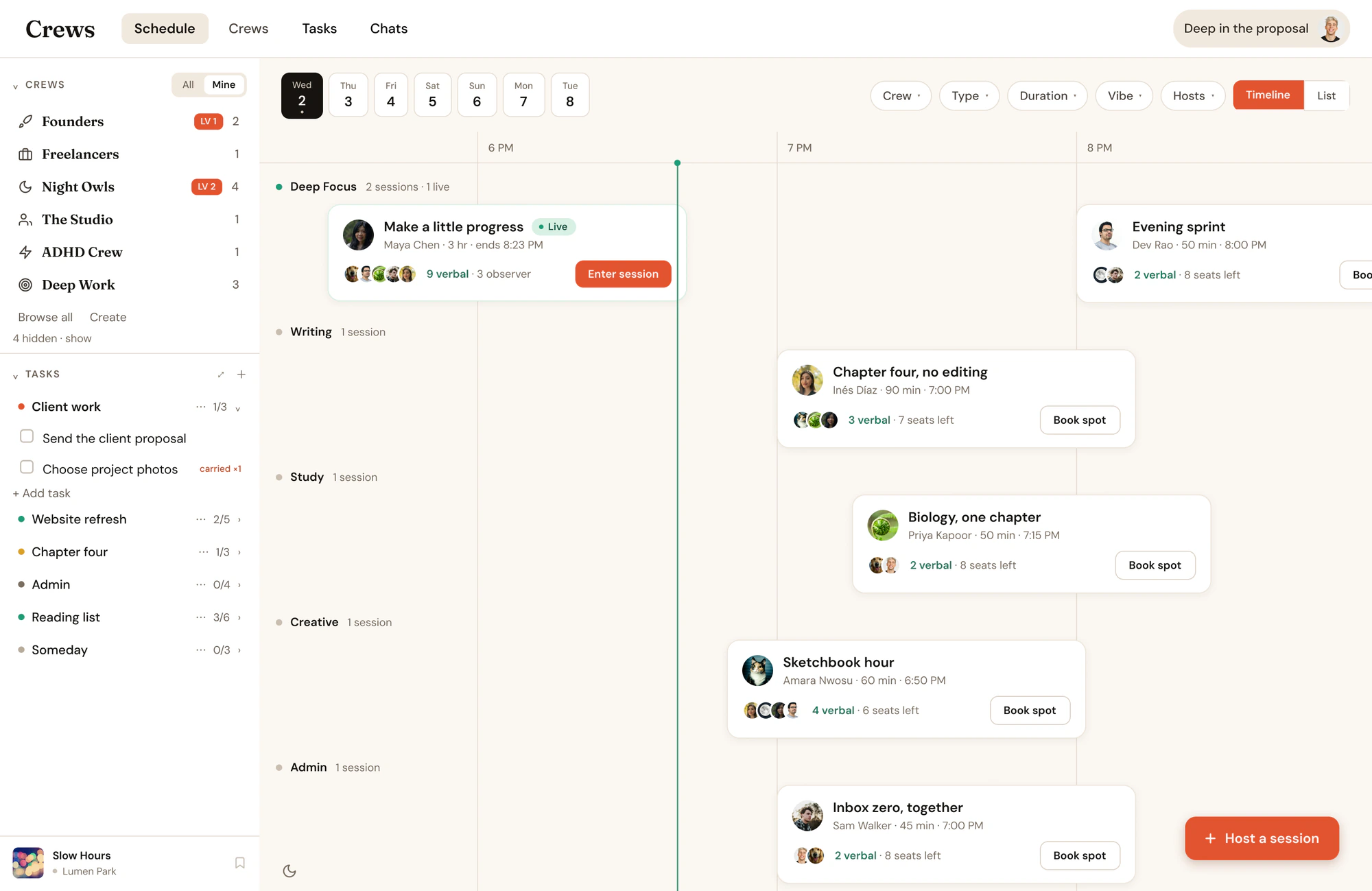
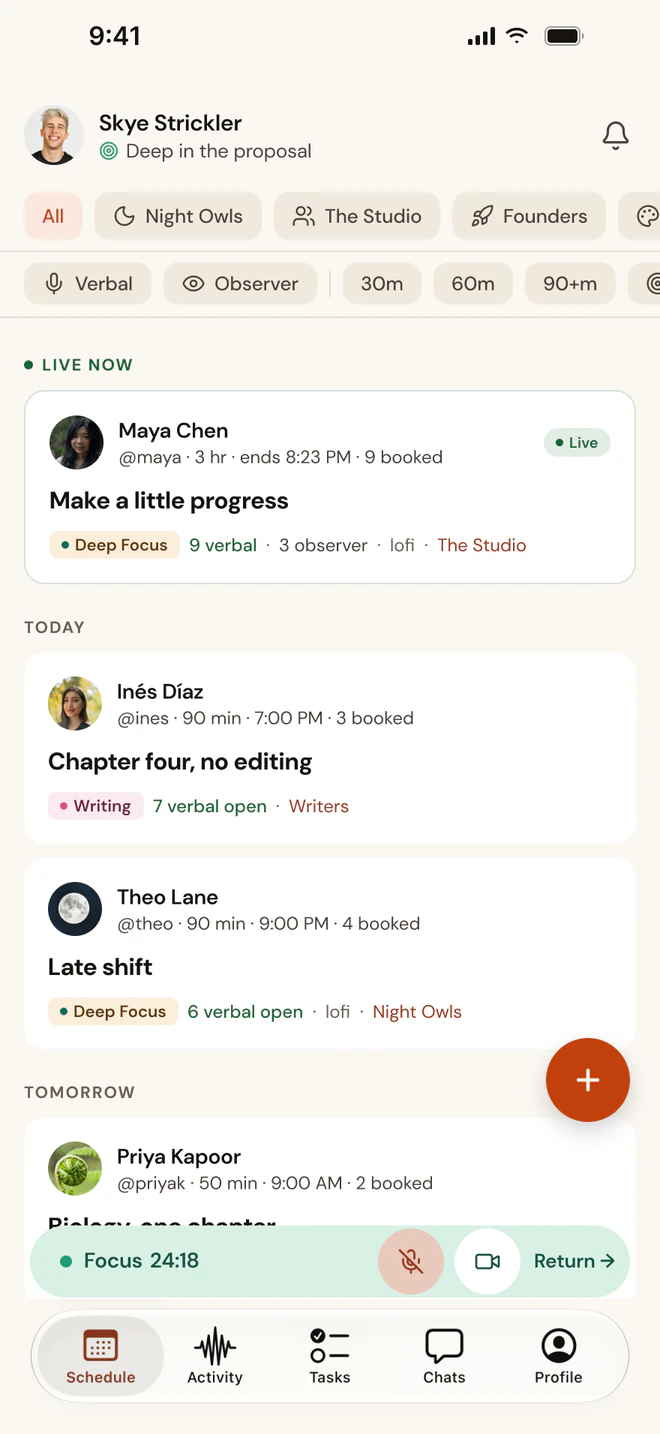
The Crews schedule: today's sessions laid out by crew on a timeline, with Maya's room live and seats open this evening.
Choose a verbal or observer seat in a session.
The Crews schedule on iPhone: today's sessions by crew, with seats open this evening.
Image — Now playing
Session room with a white now-playing panel overlapping the lower corner. 4:5.
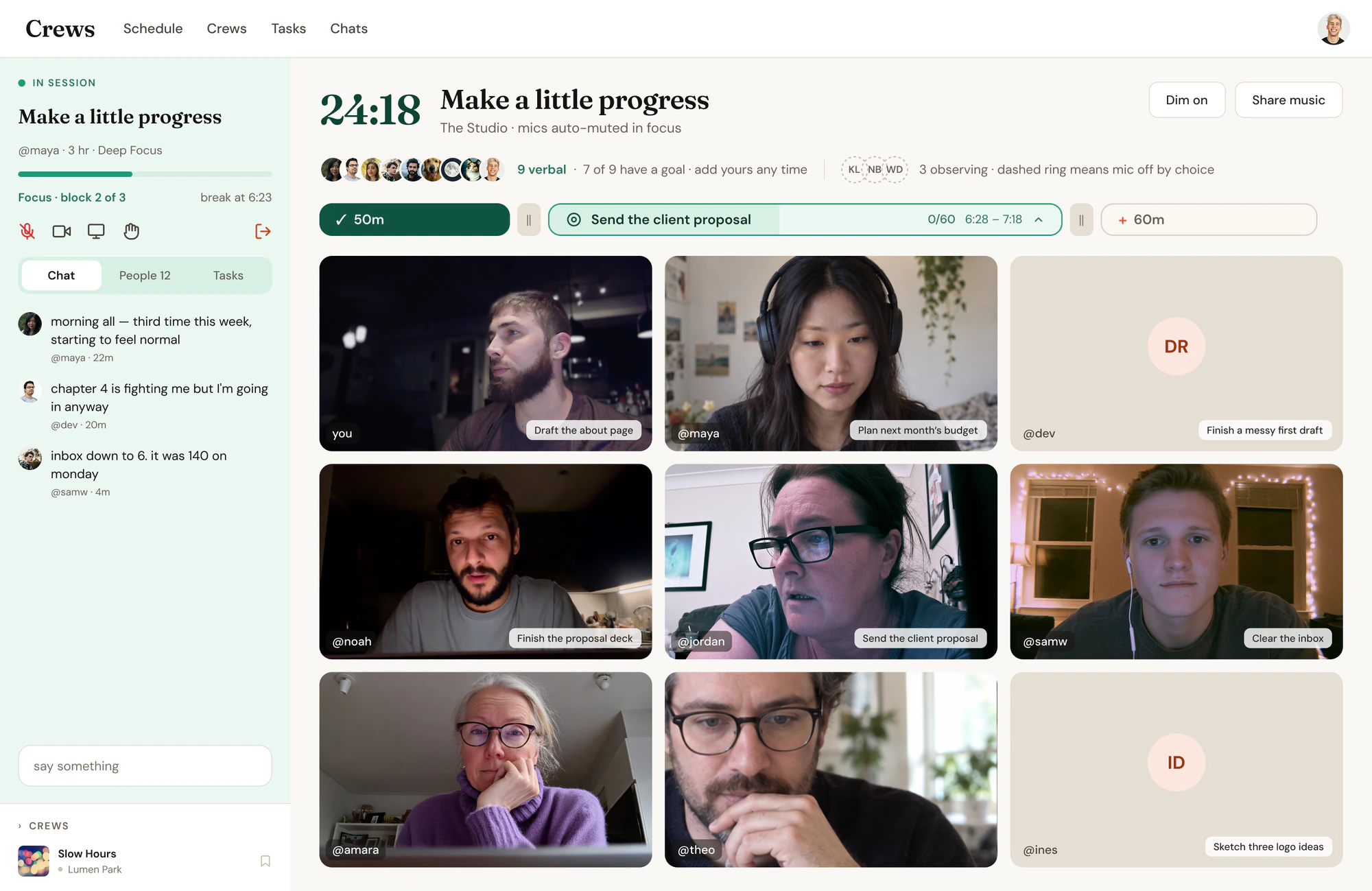
A Crews session room in focus: nine people on camera or off, each with a goal for the block, and crew chat alongside.
A shared room, with your own rhythm.
Image — Seats & status
Session room with a white seats-and-status list overlapping the lower corner. 4:5.
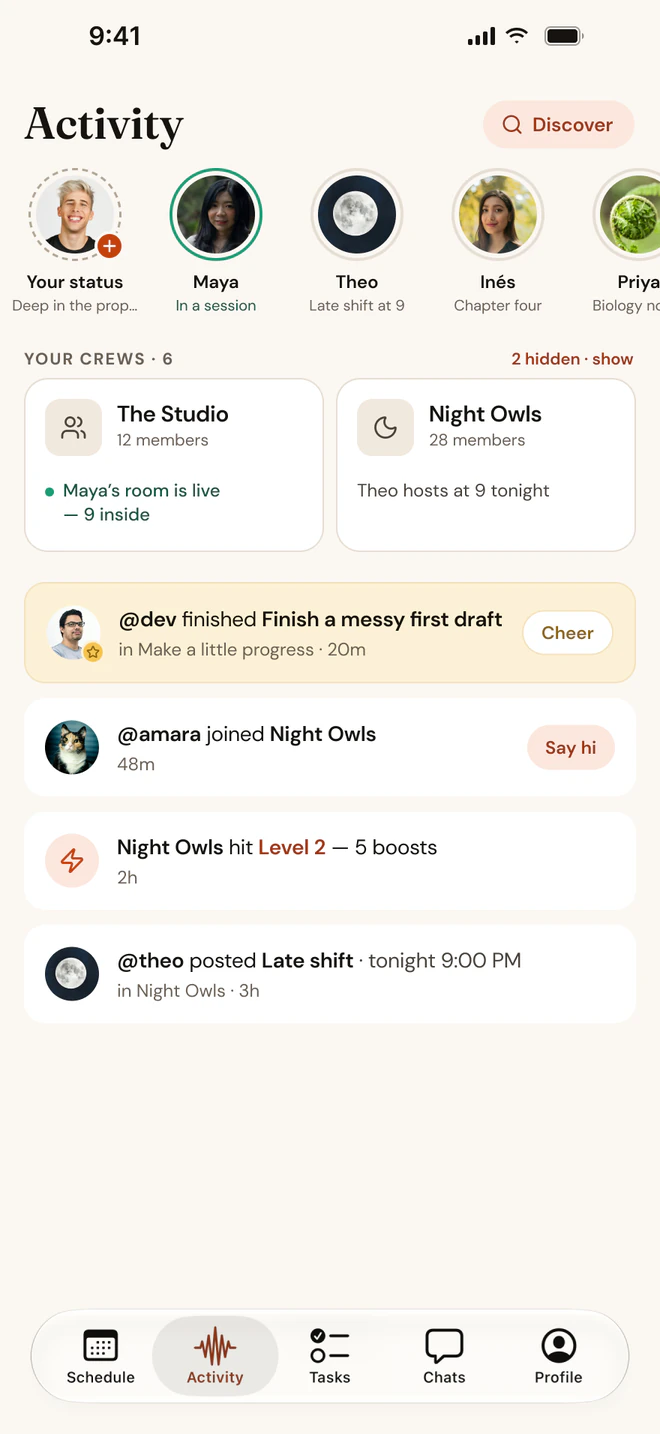
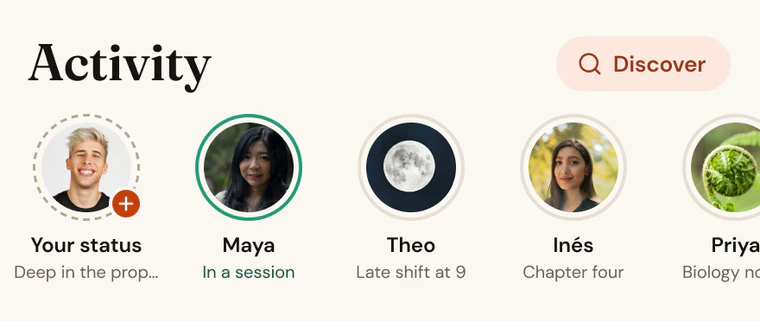
Activity on iPhone: who's in a session, statuses, and your crews.
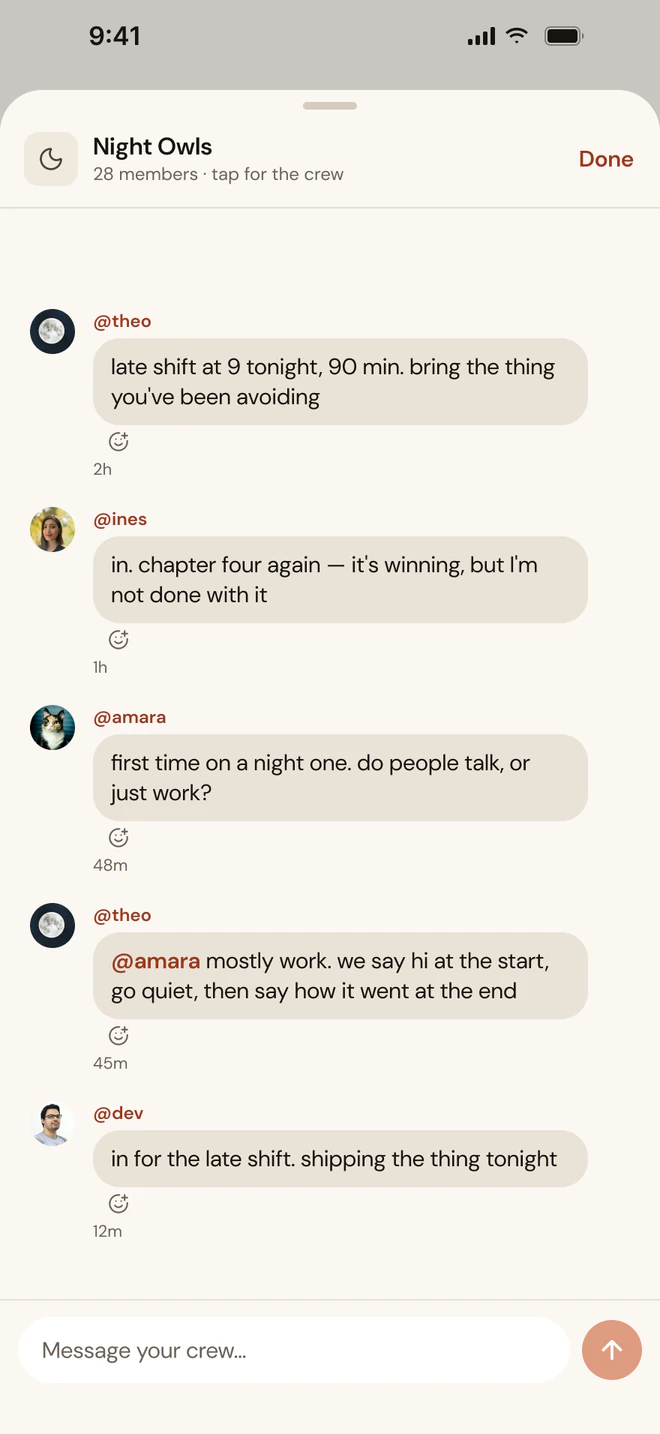
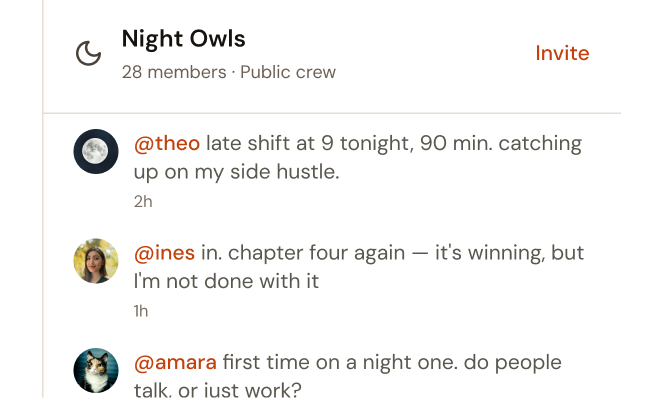
Night Owls crew chat on iPhone.
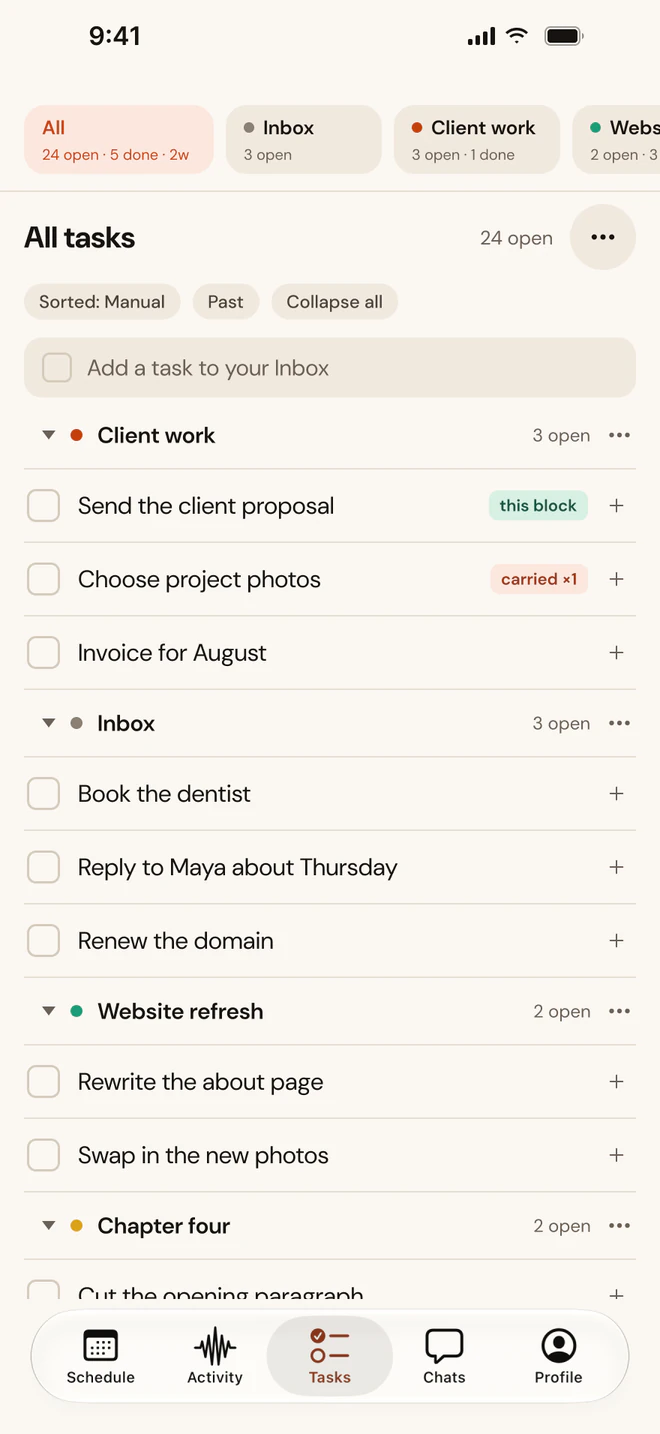
Tasks on iPhone, grouped by project.
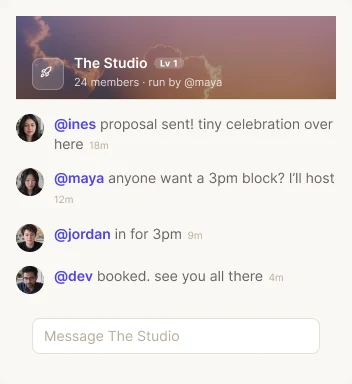
Crew members celebrating progress and arranging their next session.
The conversation keeps going.
Image — Founders crew · chat + Wins feed
Two overlapping white cards, a crew chat panel and a wins feed, with the Founders crew chip on top. No session room. 4:5.
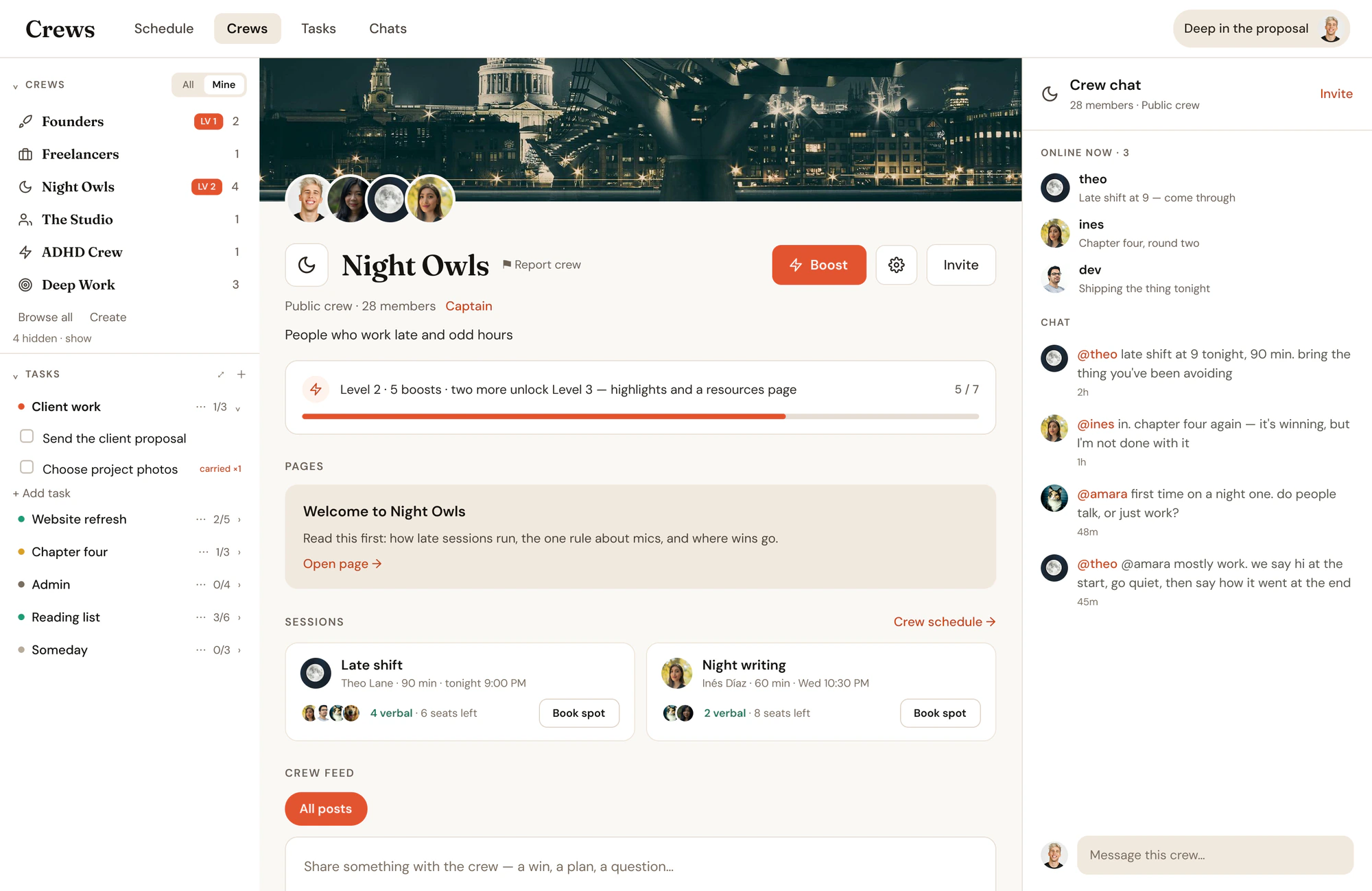
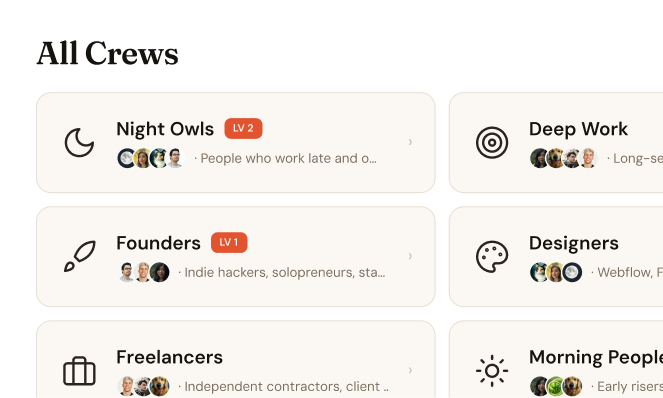
All your crews in one place: Night Owls, Deep Work, Founders, Writers and more, each with the people in it.
A home for the work—and the people behind it.

What is body doubling?

Body doubling is working alongside another person — in the same room or on a video call — so that their presence makes it easier to start and keep going. You don't collaborate; you just work near each other.

It started as an ADHD strategy and turned out to work for almost everyone who works alone. Crews runs it as live video sessions: book a seat, say what you're working on, focus with the room, check out with what you finished.

What is body doubling?

Body doubling is working alongside another person — in person or on a video call — so their presence makes it easier to start a task and stay with it. You don't work on the same thing; you just work near each other.

Does body doubling actually work?

For most people who work alone, yes. Starting is the hardest part, and other people make starting easy: a booked seat gets you to show up, a quick check-in gets you going, and a room of people quietly working keeps you there. It's especially effective for ADHD, but it's not only for ADHD.

Do I have to be on camera or talk?

No. Every session has verbal seats when enabled (camera and mic for the check-ins) and observer seats (show up and chat, but mic disabled). Hosts can also run chat-only sessions where everyone keeps cameras on and mics off. Pick what fits the day.

What makes Crews different from other body doubling tools?

Everything around the session. Most tools stop at a timer and a video call; the chat, the groups, your tasks, the music, and your status never improved. Crews keeps the people: persistent crews, chat between sessions, tasks that carry over, shared music, and observer seats so a full room is never a hard no.

How much does Crews cost?

Free for your first 14 days with unlimited sessions, then 5 sessions a month on the free plan. Membership is $25/month at standard pricing and is what lets you host; the first 500 founding members lock in $15/month. On a web membership, hosting 10+ public sessions in a month brings standard pricing down to $15 the next month, and every friend you invite who subscribes earns you $5 off a month (never below $10/month).

The session

Pick the shape your work needs.

A quick reset or a longer stretch of focus. Choose a session that fits your day, with check-ins, focus blocks and breaks along the way.

30 min
60 min
90 min
2 hours
3 hours
Optionally add a focus goal on each focus block for extra accountability.
30 min
A quick reset
3 min check-in · 22 min focus · 5 min check-out
60 min
One long block
5 min check-in · 50 min focus · 5 min check-out
90 min
Find your rhythm
5 min check-in · 50 min focus · 5 min break · 25 min focus · 5 min check-out
2 hours
Deep work, with a breather
5 min check-in · 50 min focus · 5 min break · 55 min focus · 5 min check-out
3 hours
Room for the bigger things
5 min check-in · 50 min focus · 5 min break · 50 min focus · 5 min break · 60 min focus · 5 min check-out
An icon of a hand waving
Check in

Say what you're working on. The room hears it, so you've said it out loud to someone.

An icon of a target with a bullseye
Focus

Timed blocks, cameras on if you want them, mics down. Everyone works on their own thing.

Set an intention for each block if you want, and check it off when it’s done.

An icon of a chat bubble
Check out

Say what you finished. Wins post to your crew, and unfinished tasks carry to the next one.

All session features

What you get in every room.

Beggin'
Chris Lake, Aluna · 4m
NOW PLAYING
Beggin'
Chris Lake, Aluna
Save
Garden Fiya
Magic City Hippies
Save
BLESSINGS
Naïka
Save
YOU ARE MY SUNSHINE
Marconi Union
Save
Morning Sun
Kabrio, Billy Otto
Save
Save a song. Scroll to discover more.
Hear what the host is playing.

The suite of Crews apps, including Google Chrome Extension, allows hosts to share the exact song you hear in a room, meaning when you discover a song in a session, you can save it and check it out later.

9:41
CREWS HELPER
Beggin'
Playing to the room
Mac
open.spotify.com
✳
CREWS
Beggin'
Chris Lake, Aluna
Share with room
Chrome
Vibe
🎯☀️🎨📚✍️
Deep Focus
Soundtrack
Lo-fi
Binaural
Café
Nature
Silent
Share what you're playing.
Play from Spotify or Apple Music. The Crews Helper in your Mac menu bar or the Chrome extension shares the track with the room.
SESSION LENGTH
30 min
3 hours
◎ 25m focus
+ 50m
+ 50m
Check-in · focus · breaks · check-out
30 minutes to 3 hours
From a quick half hour to a three-hour stretch, with focus blocks and breaks that fit the work.
Verbal
SK
AL
JO
Chat-only
MI
KA
EM
Your pace. Your way to participate.
9 verbal
10 observer
Observers only
Never a hard no
Speak up or join quietly
Talk through check-ins or keep it to chat. Choose the way you want to participate.
10/10
Session full
Join as observer?
Mic stays off
Join
Join a room, even when it's full.
When full seats fill up, join in as a silent observer so you can stay in the flow with the people you flow best with.
24:18
FOCUS
Public
Let’s goooo
@skye · 60 min · Deep Focus
Who gets in
Public
Crew
Private link
Who gets in
Public
Crew
withcrews.com/j/7f2q
Public, crew-only or invite-only
Public on the schedule, crew-only, or a private link you hand out yourself.
Wednesday · 3–4 pm
Repeat when:
Daily
Weekly
Monthly
Repeats
M
T
W
T
F
Every Tuesday
Tue 9:00
Booked
Tue 9:00
Booked
Tue 9:00
Book
Make it a weekly thing
Book it once a week and it repeats. Your regulars can take the whole run in one go.
●
Let’s goooo
Leave
Focus · mics muted automatically
Check-in
70:49
Mics live
Focus block
42:10
Auto-muted
Mics mute when focus starts
Mics drop when the focus block starts. Switch it off if your room talks through the work.
This session
Launch Crews
⠿
Polish the homepage
⠿
Finish mobile previews
carried from last session
⠿
Write launch email
+ Add a task
All tasks
Launch Crews
⠿
Polish the homepage
⠿
Finish mobile previews
carried from last session
Studio website
⠿
Sketch the about page
⠿
Choose project photos
TASKS
bop
0/2
Ort map updates
Mobile optimize edu dashboard
carried ×1
Unfinished tasks stay with you.
Next session →
Your tasks, ready when you are.
Complete a task, then try the next session.
Tasks that follow you

Session goals become task groups. Unfinished work carries into your next session — never lost.

Q4 PLAN
Launch week
Maya is sharing
Camera
Sharing screen
Share your screen with the room
with boosts
Show the thing instead of describing it. Crew sessions at Level 3, and every sponsored crew.
Night Owls
Level 0
Night Owls
Lv 1
Banner + accent
Make the room feel like yours
A banner and an accent colour, so the room reads as yours before anyone joins it.
Tab around. The room stays live.
Move between tasks, projects, people and the schedule while your session stays connected. Your room is always a click away.
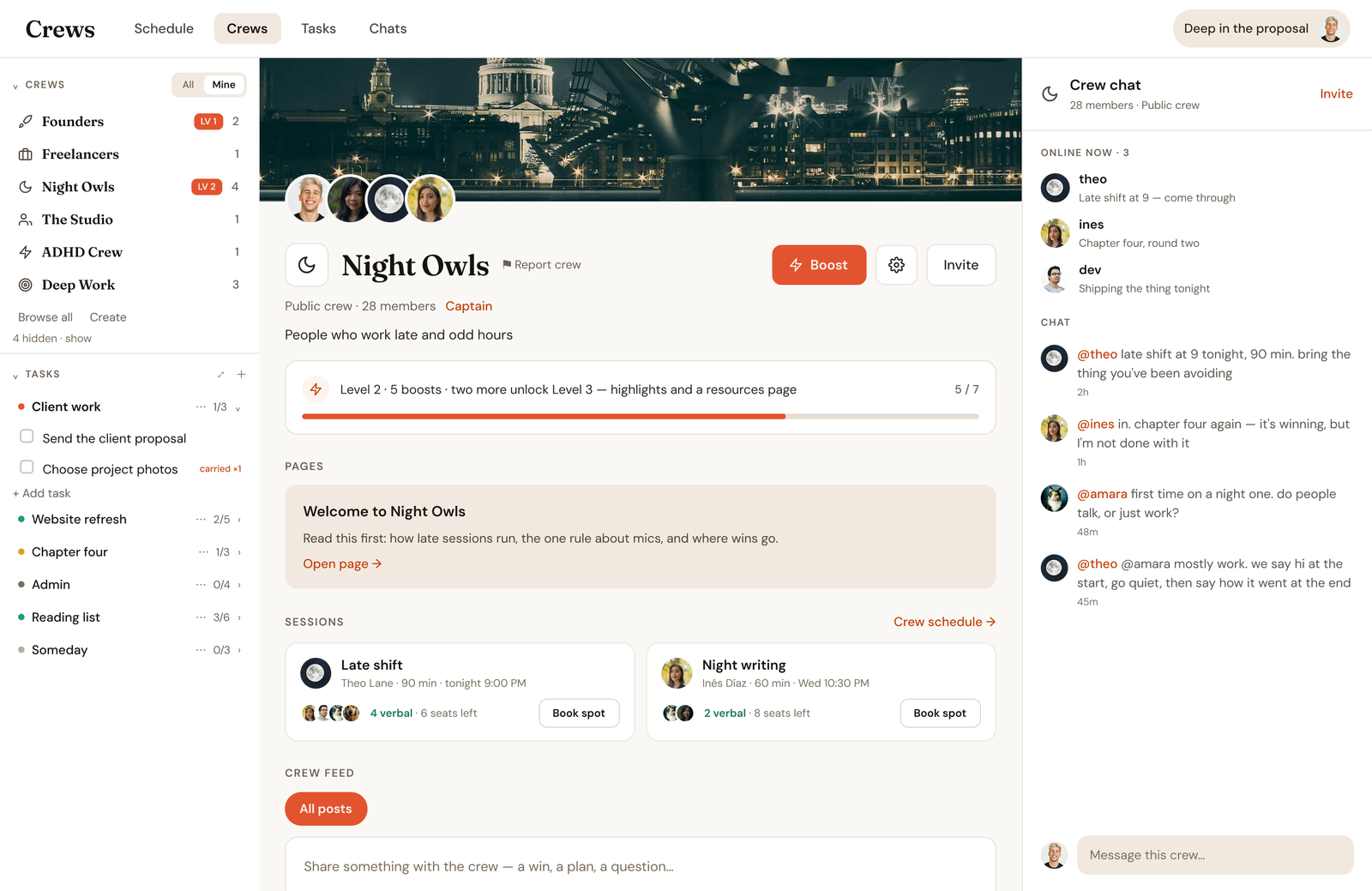
The top of the Night Owls crew page, with its banner, members and who's online now.
Hosting comes with membership — no application, and no waiting until you've sat through ten sessions first. Host ten public sessions in a month and you'll get ten dollars off the next one.
More than a session

Accomplish things, while building connections.

You come to get things done. Along the way, you meet people you vibe with. Follow them, keep the conversation going, and find a crew that feels like yours.

Crews Activity on iPhone: your status, and Maya in a session, Theo and Inés with theirs
Follow & connect

Follow people you vibe with. See when they're online. Build real relationships.

Night Owls crew chat: Theo posts tonight's late shift and Inés says she's in
Crew chat

Chat between sessions. Share wins, resources, and ask who's working later.

Your crews: The Studio with Maya's room live, and Night Owls with Theo hosting at 9
Crews & communities

Join Founders, Night Owls, Writers, ADHD Crew — or create your own.

iPhone + iPad

Accountability that follows you.

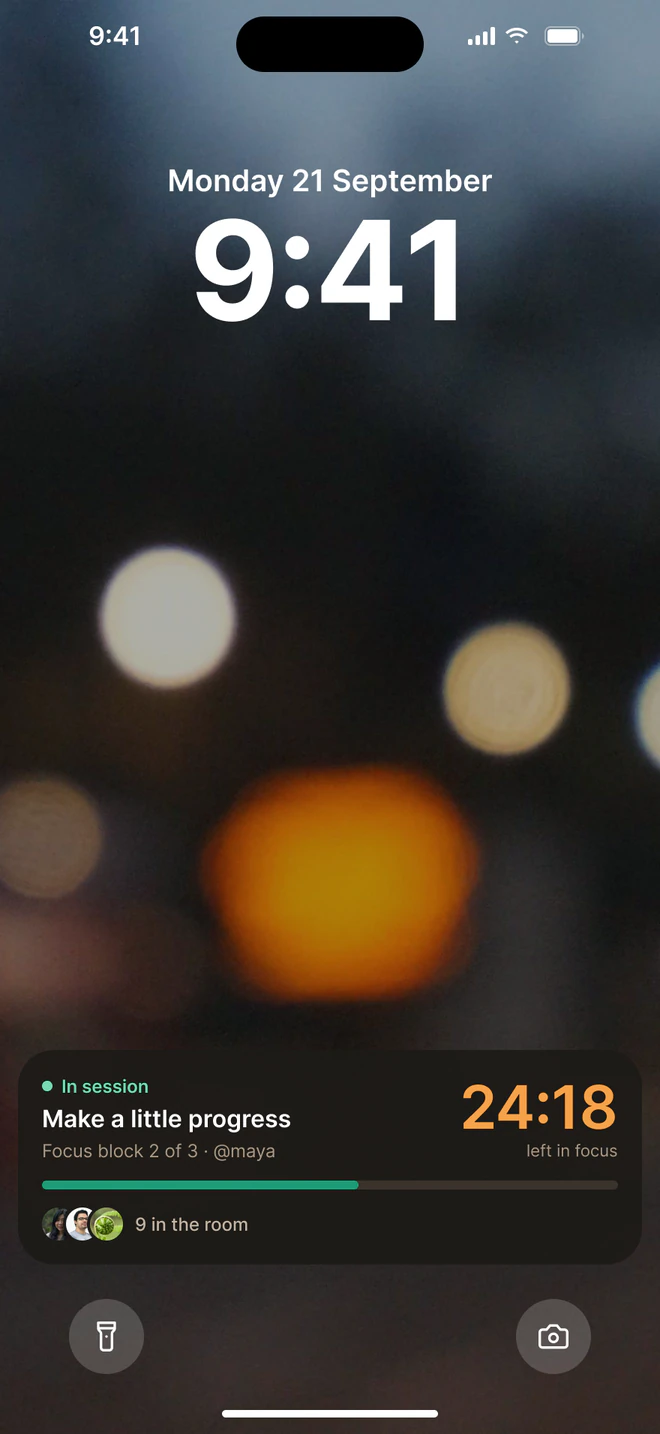
Book a seat, join the room and keep up with crew chat from your phone. Lock it, and the timer stays on your Lock Screen.

Out now on the App Store, free for iPhone and iPad.

Activity on iPhone: who's in a session, statuses, and your crews
Night Owls crew chat on iPhone
The Crews schedule on iPhone
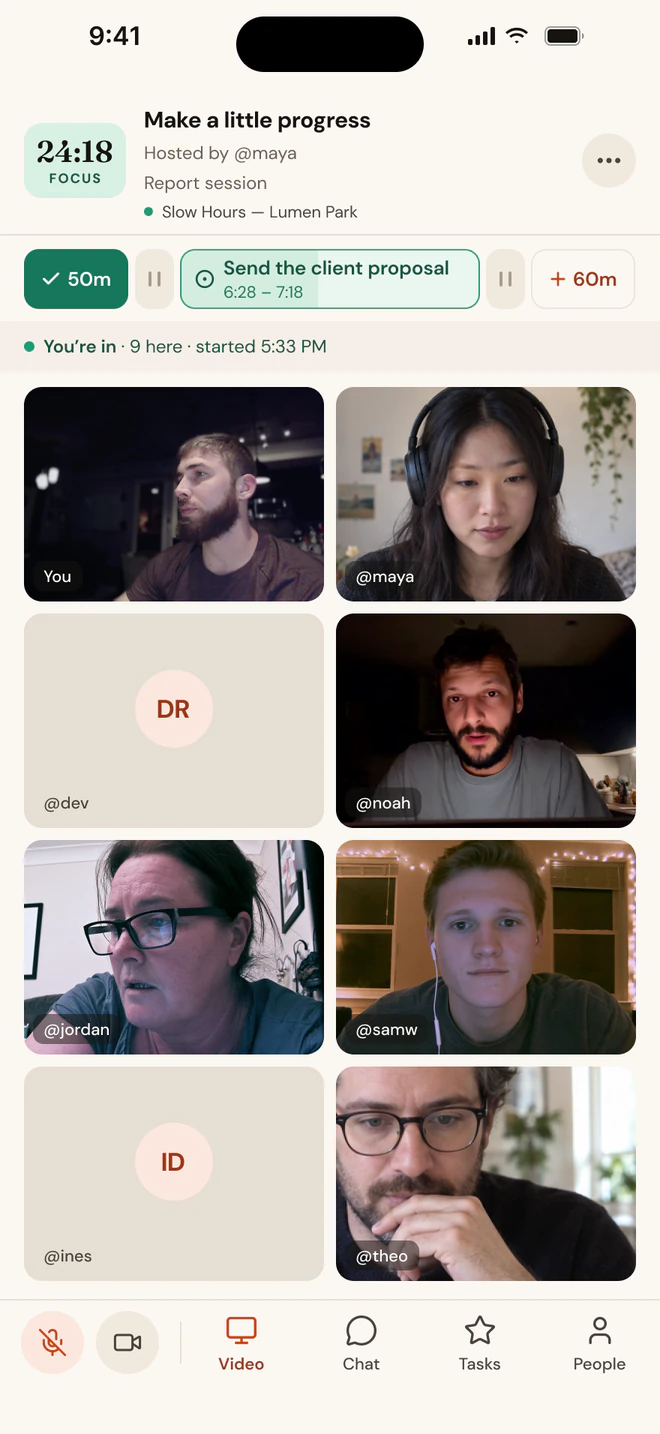
A session room on iPhone, in focus with 24:18 left

About these screenshots

We're just getting started, so the people in these screenshots are AI-generated to show what a session feels like. Everyone you'll work alongside in Crews is real.

The Crews Live Activity on the iPhone Lock Screen with the focus countdown
Tasks on iPhone, grouped by project
Someone at their desk glancing at their Crews session on Apple Watch: Focus, 24:18 left, and the goal Send the client proposal.
Apple Watch

Accountability you can feel.

Your phase, the time left and your goal sit on your wrist, and a gentle tap tells you when it's time to switch. It follows your session however you joined: on the web, on your Mac or on your phone.

Free on the App Store. The Watch app installs with the iPhone app.

More for your crew

Everything your crew keeps between sessions.

Give your crew more ways to connect, share knowledge, and work together. Membership includes boosts that unlock extras for the whole crew.

Pages & resources

Welcome new members, collect useful links, and give your crew a home for the knowledge you share.

Chat & feed

Keep the conversation going with crew chat, announcements, and polls. Save the best moments to Highlights.

coming soon
Reusable task templates

Turn a checklist on a crew page into tasks members can add to their own list in one click.

Invites & access

Keep your crew public or private, and make it easy to invite your people with a custom link.

Room for more people

Bring more people into your sessions, with verbal seats and quiet observer seats so everyone can find their place.

Look & feel

Make your crew recognizable with its own banner and accent color, and highlight the person or organization behind it.

Share your screen

Walk through a presentation, review a draft, or work through a problem together, right in your crew session.

Working together never requires a boosted crew.

Why Crews

Other platforms stop at the timer.

Same live rooms, same check-ins, same idea. The difference is what exists between the sessions, and what the whole thing costs you.

Feature
Crews
Flow Club
Focusmate
Flown
Cave Day
Full access
$15/mo
$20–40/mo
$8–12/mo
$19–25/mo
$30–40/mo
Free sessions
14-day Trial, then 5/mo
Trial only
3 a week
4 a month
Trial only
Founding rate
$15/mo, locked
—
—
—
—
Room size
Up to 20
Up to 10
1:1 paired
Facilitated group
Guided group
Verbal and observer seats
Both, every room
Chat-only option
Quiet mode
Silent drop-ins
Muted in sprints
Ambient music
Host shares, save your favorites
Host shares
—
—
—
Task tracking
Projects and subtasks
Basic to-do list
One intention
Intention setting
—
Tasks carry to next session
Yes
Yes
—
—
—
Host your own sessions
Right away
After 10 sessions
—
—
—
Native mobile app
iOS, iPad, MacOS, Watch
—
—
—
—
See the full comparison →
Helpers for hosts

Set the soundtrack for your room.

Hosting a session? Two small, optional helpers share whatever you're playing in Spotify or Apple Music with your room automatically, so everyone works to the same music and you never have to paste a link.

CrewsFileEditViewWindow
24:18
Tue 9:41
Deep work
Deep work
24:18
Focus · 4 in the room
Beggin'
Playing to the room
Mac menu bar · Free download
Crews Music Helper

For the desktop apps. Notices what you're playing in Spotify or Apple Music on your Mac and shares it with your session. It sits in the menu bar and does nothing else.

Beggin' · Spotify
Deep work · Crews
open.spotify.com/track/beggin
✳
Crews
Sharing
Beggin'
Chris Lake, Aluna
To Deep work · 4 listening
Live in the Chrome Web Store
Chrome — Now Playing

For the web players. Shares what you're playing on Spotify or Apple Music in the browser with your session, automatically, with no manual pinning.

Both are free and optional. The Music Helper needs macOS 13 or later and is signed and notarised by Apple.

Lock in the $15/mo founding rate.

The first 500 members get $15/month when subscribing online, locked in for as long as you stay subscribed. Everyone after pays $25.

$15/mo Founding Rate & $25/mo Regular Pricing are web subscription pricing only.